

Analytics & reporting

Know how the month is going before it ends.

See what’s earning, who’s returning and where to look closer.

A studio owner and accountant looking over a report together.
Ready for your accountant A file you can hand over. Excel · CSV · PDF Illustration · report export formats
The bigger picture

See what’s shaping your month.

A busy calendar tells part of the story. Your reports fill in the rest.

  1. Sales

    What actually came in?

    Sales, tax, payments and refunds, with the dates you choose.

  2. Team

    What is each person bringing in?

    Sales, tips, commissions and revenue per hour, by team member.

  3. Appointments

    How is your time being used?

    Booked hours, rebooking, cancellations and no-shows.

  4. Clients

    Who is coming back?

    New, returning and inactive clients, visit frequency and referral sources.

  5. Follow-up

    What needs a closer look?

    Unused gift cards and packages. Member billing, stock value and missing forms.

  6. Expenses

    Where did the money go?

    Recorded expenses by category, vendor, location and payment status.

When the accountant asks

The accountant asks. You have the file.

Illustrative workflow · example records

Choose your dates. Export an Excel, CSV or PDF file. We email when it’s ready to download from History.

Report options
  • Ready-made ranges like the last 30 days, or your own start and end
  • Excel, CSV or PDF, from the report’s History when it’s ready
  • From the iPhone app too: export, then download or share the file from History
Support your team

A clearer picture of your team.

Illustrative workflow · example records

See each person’s rebooking, sales and average ticket. Bring context to your next conversation.

Report options
  • One team member at a time, where the report offers it
  • One location at a time, where the report offers it
  • Browse the reports your role may see by category, and search them by name
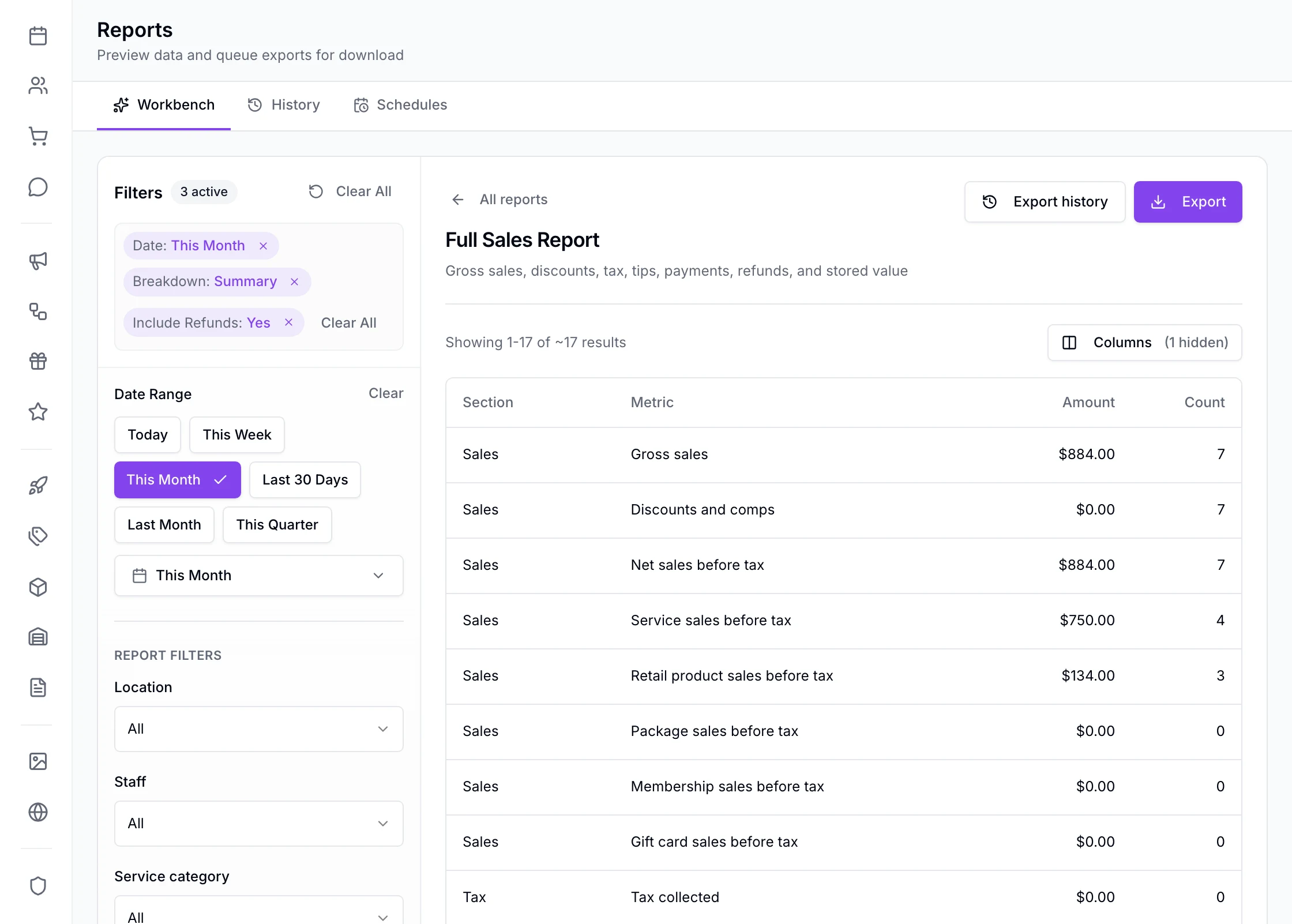
See the Full Sales Report
Reports › Workbench in EstheticSense: the Full Sales Report run for this month, with the date presets and report filters beside it, the Export button, and the summary rows from gross sales and net sales through service and retail sales to tax collected.
Open the full-size product capture (new tab)
For your team

Give your team the right view.

  • Their own reports

    A team member allowed only their own can run their own schedule, outcomes, cancellations and no-shows, and rebooking.

  • Their own locations

    Someone limited to certain locations sees only those.

  • Client details by permission

    Shown only to people allowed to see them.

  • The library by role

    Reports shows each person the reports their role may see.

Also included

A little more detail.

Explore the controls behind the numbers.

Running a report
  • Run it on screen, page through the rows, hide the columns you don’t need
  • Ready-made date ranges or your own
  • Narrow to one location, where the report offers it
  • Narrow to one team member, where the report offers it
  • Filter by the report’s own details
On your iPhone
  • Browse, search, run and filter reports in the EstheticSense iPhone app
  • Export from the iPhone app and download or share the file from History

Before you decide

Switching from another tool?

Plan the move before anything changes at your business.

Plan the switch

What does it cost?

Reports are included in the subscription.

See pricing

Not available yet

Reports you design yourself, a dashboard you arrange, comparing locations side by side, forecasting, and Android are later. A report shows what was recorded; it doesn’t advise.

Related Your dayPayments & checkoutProducts & inventoryTeam & hours

Understand your business

Make sense of your month.

See how sales, client and team reports help you decide where to look next.

$19 first provider · $149 maximum per location