

Commissions & tips

Clear agreements. Clearer earnings.

Keep commission agreements, earned tips and payment records together. Give your team a clearer view of their work.

For spas, salons, and light-medspa teams.

One sale, Tuesday

Who earned what, line by line.

From the original sale to a later refund, keep the reason behind each earning.

Harper’s visit · Oct 6Jordan’s earnings
Service commission Microneedling
$60.00
Retail commission Serum
$4.80
Card tip Recorded at checkout
$65.00

A refund later?
A linked adjustment keeps the original earning in view.

PendingApprovedPaid

Mark paid after paying through your usual process.

Illustrative earnings · example amounts
How the entries are recorded
  • Service. Use the provider’s rate for that date, including any service-specific agreement.
  • Retail. Choose whether each person earns on retail, with a separate rate.
  • Tip. Record the checkout tip against the provider, split by service value when shared.
  • Adjustment. A linked adjustment reduces the earning. The original line stays in place.
  • Paid. After paying outside EstheticSense, mark approved lines paid with a reference.
  • A provider earns commission on a service the client pays for with a package session
  • A disputed card payment flags the commission for a manager to adjust with a reason, or dismiss
When the deal changes

New agreement. Clear start date.

Illustrative workflow · example records

Give a commission change its start date. Keep earlier agreements in the history, with the earnings already recorded at their original rate.

Agreement options
  • Record an hourly or salary base, or an agreement for the greater of base and commission; wage calculations stay outside EstheticSense
  • A different pay agreement at one of their locations, used for sales there
  • A custom commission for a specific service, as a percentage or a flat amount
  • Mark externally or jointly tracked sales; EstheticSense records no commission on those sales
  • In the iPhone app, set or change a team member’s pay, including a different agreement at one location
On the first of the month

Review the earnings before you pay.

Illustrative workflow · example records

Review commission and tip lines with their source, rate and status. Approve, or void with a reason, then mark approved lines paid after paying through your usual process.

Review and payment records
  • A CSV of the filtered lines for your accountant, with the sale, tip routing, adjustment and payout details
  • Earnings totals keep tips already received in cash apart from what the business still owes
  • When the business allows it, team members record cash tips they were handed on Pay & earnings in the staff web app
  • In the iPhone app, managers review lines with the same filters and totals, and approve, void or mark them paid
See the commission records
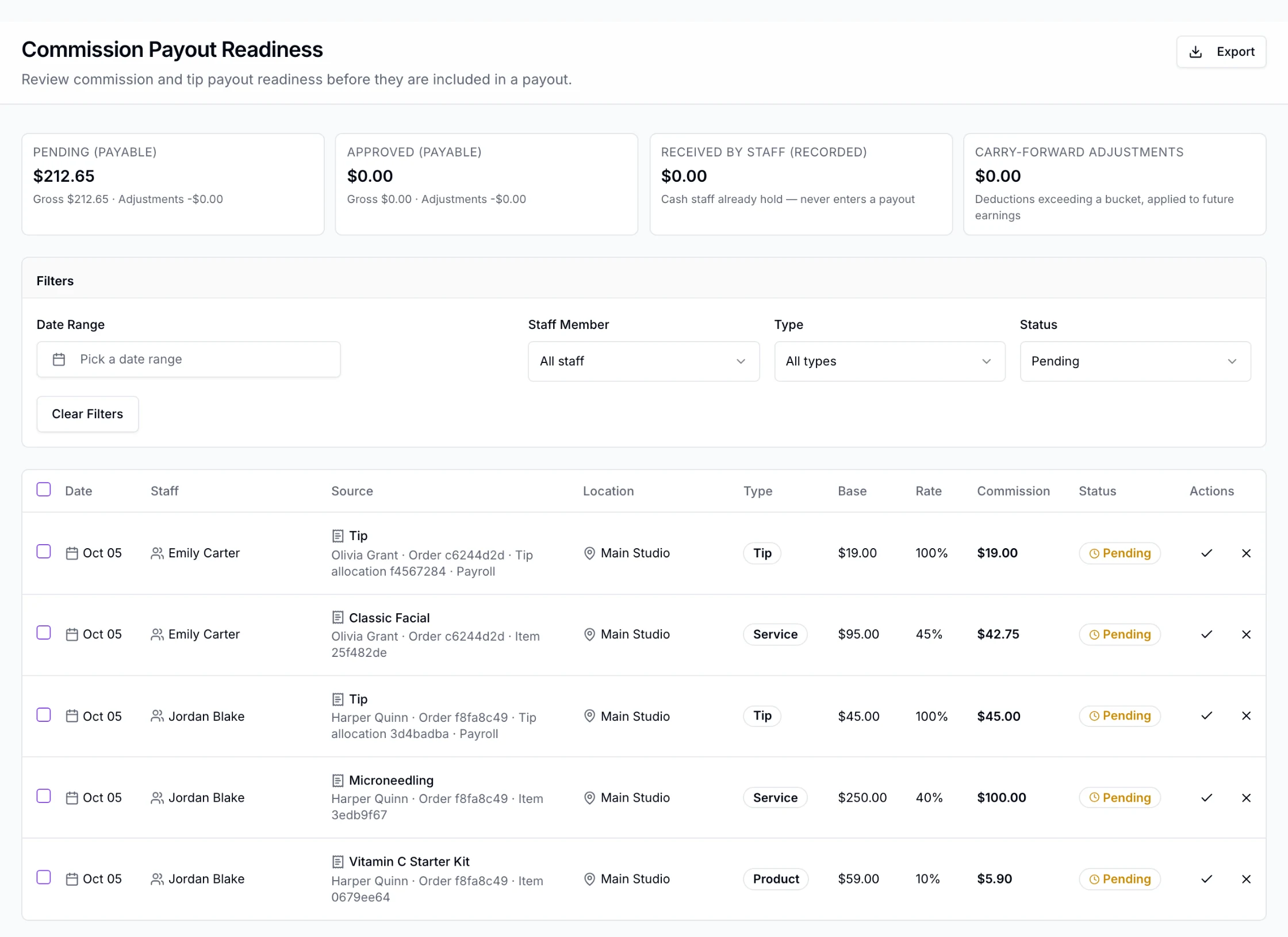
Staff › Commissions in the EstheticSense staff web app at Main Studio: Commission Payout Readiness with the Pending, Approved, Received by staff and Carry-forward tiles, the filters set to Pending, and five pending lines: Emily Carter’s Classic Facial and tip from Olivia Grant’s sale, and Jordan Blake’s Microneedling at 40%, Vitamin C Starter Kit at 10% and tip from Harper Quinn’s sale, each with its base, rate and commission.
Open full-size product capture (new tab)
For your team

Their own earnings. Only their own.

  • See their own earnings

    Period totals and pending earnings on web and iPhone. Their own pay rate stays in view on iPhone.

  • Keep pay changes with the right people

    Permission controls who changes pay and approves earnings. Staff see only their own earnings, with client surnames shown only when allowed.

A few practical answers.

Switching from another tool?

Bring each person’s current deal; it goes in with a start date.

Plan the switch
What does it cost?

Commissions & tips are included in the subscription.

See pricing
Not available yet

Tiered commission that steps up with sales, commission on selling packages, memberships or gift cards, sending records to a payroll provider, closing a pay period, and Android are later. EstheticSense never pays commissions or tips out, never works out wages, overtime or taxes, never pools tips, never adds a service charge, and never sets pay by licence.

Related Payments & checkoutTeam & hoursTime clockAnalytics & reporting

Every earning, explained

A clearer conversation about earnings.

See how agreements, tips and earning records stay connected. Payments and wage calculations stay in your existing payroll process.

$19 first provider · $149 maximum per location